
Time Stamp #
Technical Explanation of Timestamps in Reverse Engineering #
We will now examine the application of timestamps in reverse engineering scenarios. Timestamps typically appear in two formats:
- Second-level timestamps (10-digit)
- Millisecond-level timestamps (13-digit)
Key Implementation Notes:
- Python Examples:
import time  # Import the time module to handle time-related operations

hiddenText = int(time.time())  # Get current timestamp in seconds (since epoch) and convert to integer
test2 = int(time.time() * 1000)  # Get current timestamp in milliseconds and convert to integer

print(hiddenText)  # Print the seconds timestamp
print(test2)  # Print the milliseconds timestamp


test3 = str(int(time.time()))  # string (seconds timestamp)
test4 = str(int(time.time()*1000))  # string (milliseconds timestamp)

print(test3)  # Print the seconds timestamp
print(test4) # Print the milliseconds timestamp- Practical Considerations:
- When analyzing network requests (URLs, headers, or bodies), explicitly identify the timestamp digit format
- For Java-based second/millisecond conversion:
- Milliseconds to seconds: timestamp / 1000
- Seconds to milliseconds: timestamp * 1000
- Critical Technical Detail:
When passing timestamps in request headers (e.g., using Python’s requests.get()), ensure conversion to string format. correct implementation:
headers = {'t': str(int(time.time()))} # String conversion requiredRecent observations show that failing to stringify timestamp values in request headers consistently causes API errors. This remains one of the most frequent oversights among beginners.
Practical Case Study: Timestamp Handling in Reverse EngineeringScenario: The ‘_rticket’ parameter in an application’s API
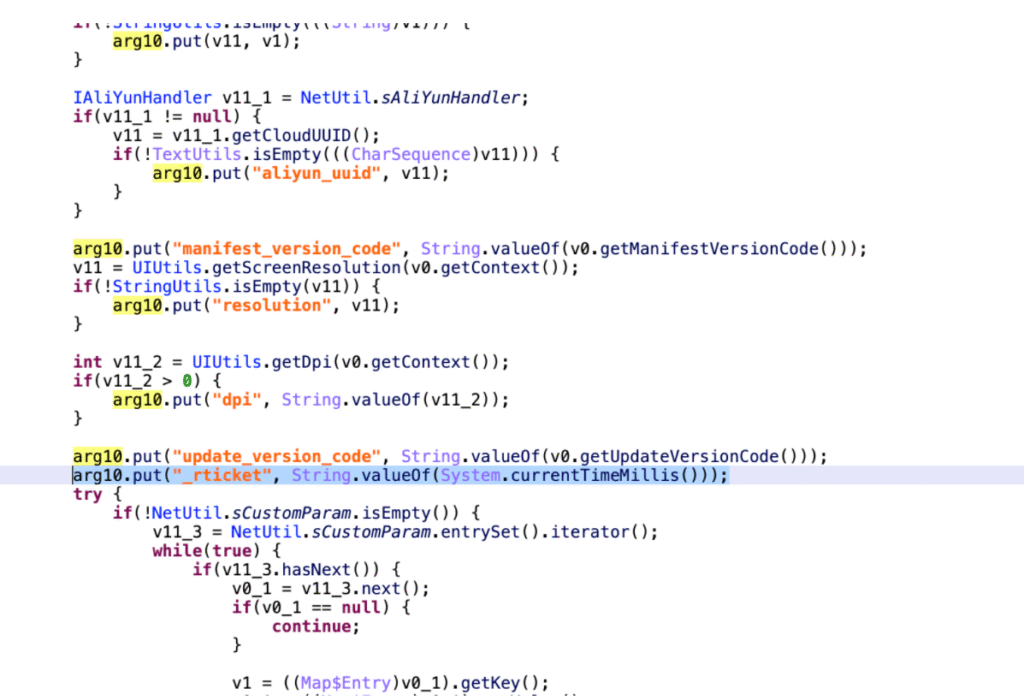
public class Hello {

    public static void main(String[] args) {
        // Current timestamp in seconds
        String t1 = String.valueOf(System.currentTimeMillis() / 1000);

        // Current timestamp in milliseconds
        String t2 = String.valueOf(System.currentTimeMillis());

        System.out.println(t1);
        System.out.println(t2);
    }
}
Random value #
Analysis of Random Strings in Reverse Engineering
whether the observed value is dynamic during reverse engineering
Let’s examine random strings commonly encountered during reverse engineering. While Python’s random module can easily generate random strings, we need to distinguish between two main types in reverse engineering contexts:
In reverse engineering, you often encounter “random values.”
It mentions that Python can easily generate random strings, for example using random.
Two types of random strings
Type 1: Contains 26 English letters and digits, like a random combination of letters and numbers.
Type 2: Contains digits, but letters are limited to a–f, which is a typical hexadecimal string.
Don’t mistake it for Base64, because Base64 has a larger character set (A–Z, a–z, 0–9, +, /).
In Java/Android, generating hex strings is more common because the code is simpler.
If you want to generate random strings with all 26 letters, Java has to create a character array and then randomly combine them, which is more troublesome.
Therefore, in most apps, the random values you see are actually in hexadecimal form.
This methodology significantly improves analysis efficiency in real-world scenarios.
package EncryptionToolkit;
import java.math.BigInteger;
import java.security.SecureRandom;
import java.util.UUID;

/**
 * @author calleng
 * @version 1.0
 * @date 2024/07/07 11:54
 * @desc
 */

public class Udid_Tool {

        public static void main(String[] args) {
            // Randomly generate an 80-bit (10-byte) value
            BigInteger demo_variable = new BigInteger(80, new SecureRandom());
            // Display the bytes in hexadecimal format
            String resources = demo_variable.toString(16);
            System.out.println(resources);
            String uid = UUID.randomUUID().toString();
            System.out.println(uid);
        }
}

// 82163ea229c6911d791c
// 929d9fef-e6a4-4d08-94bc-85d2b02181c5
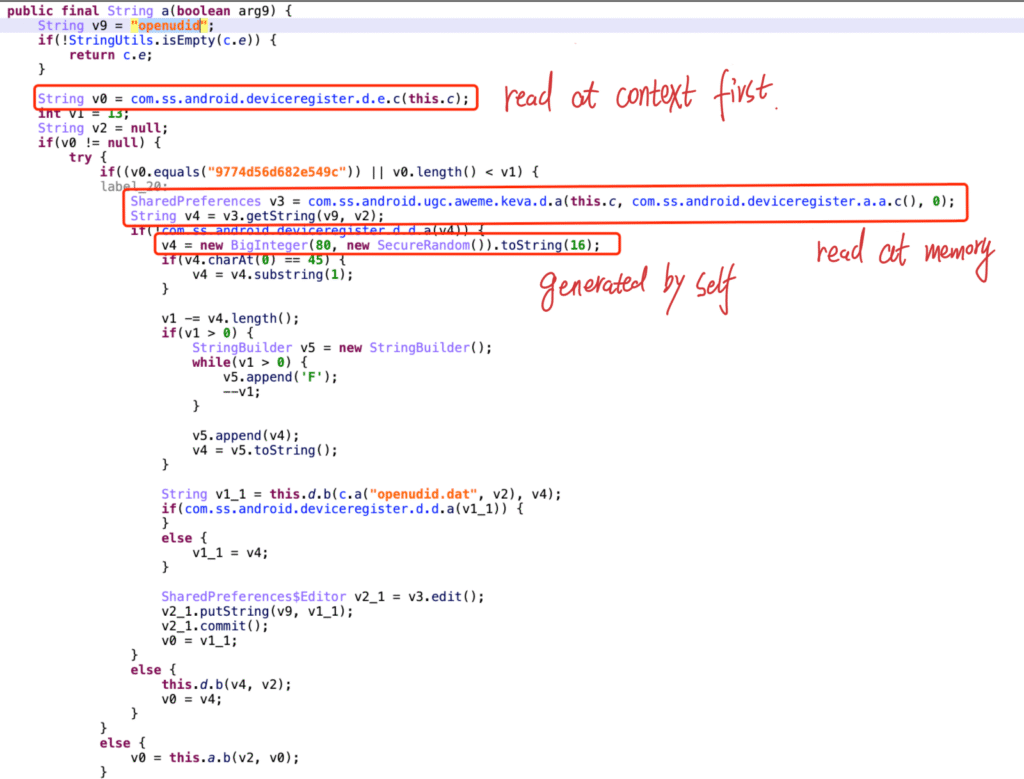
This is the approach being used. Let me show you first. For example, it generates a random number with BigInteger(80, new SecureRandom()). The 80 here means 80 bits, essentially a sequence of 0s and 1s. Since 8 bits equal 1 byte, 80 bits amount to 10 bytes.
Then, those 10 bytes are converted into hexadecimal, producing a string that looks like this.
In Android or Java, this method is very common and convenient for generating random values. Of course, Python can do the same—I’ll explain the Python version later. But for now, just look at this example: in some app code, you can also find similar usage, such as simply writing v4 = … to get the value.
real-world example : openudid
import random

# =====================================================
# Basics: Python 3.9+ random.randbytes()
# =====================================================
# In Python 3.9 and newer, the random tool got a new function called randbytes(n).
# It can make n random bytes.
# A byte is a tiny unit of data. One byte can hold a number from 0 to 255.
# Here we make 10 random bytes.
data = random.randbytes(10)
print(data)
# Example output: b'\xec\xd5\xd6\x15+\x16\xf9\xc9\xee\x84'
# The "b" at the start means this is a bytes object, not a normal text string.
# In bytes, if a letter or symbol is easy to show, Python shows it directly.
# If not, Python writes it as \xNN (hex code form).

# Here is a fixed example:
example = b'Uq\xac\xbb]\xd7\x10\xd7\x82\xdb'
# This is a bytes object with length 10.
# When Python prints it:
# - It shows normal letters like 'U', 'q', and ']' directly.
# - It shows other numbers as \xNN.

# We can look at each byte one by one:
# Hex value   Decimal value   Shown as
# 0x55        85              'U'
# 0x71        113             'q'
# 0xAC        172             \xac
# 0xBB        187             \xbb
# 0x5D        93              ']'
# 0xD7        215             \xd7
# 0x10        16              \x10 (control symbol, not visible)
# 0xD7        215             \xd7
# 0x82        130             \x82
# 0xDB        219             \xdb

# --- Compare with Java ---
# In Java, you can make a hex string like this:
#   new BigInteger(80, new SecureRandom()).toString(16);
# Python does not have .toString(16),
# but we can do the same thing by looking at each byte.

# 1. Print a list of numbers (turn bytes into decimal numbers)
print([item for item in data])
# Example: [82, 153, 158, 19, 92, 148, 251, 29, 30, 227]

# 2. Change each number to hex (with "0x" at the front)
print([hex(item) for item in data])
# Example: ['0xea', '0x82', '0xc6', ...]

# 3. Remove the "0x" so we keep only the hex numbers
print([hex(item)[2:] for item in data])
# Example: ['ea', '82', 'c6', ...]

# 4. Put all pieces together into one big string
print("".join([hex(item)[2:] for item in data]))
# Example: ea82c66fcceb3314277a
# This is the same idea as Java’s toString(16)


# =====================================================
# Part 1: Add "0" in front if needed (padding)
# =====================================================
# Some apps want each byte to always have 2 hex numbers.
# Example: "0e" instead of "e".
# In Python we can use rjust(2, "0") to add "0" if it is too short.
print("".join([hex(item)[2:].rjust(2, "0") for item in data]))
# Compare:
# Without padding: e62f939b2403426bd6
# With padding:    0e62f939b2403426bd06


# =====================================================
# Part 2: Hex Dump Formatter example
# =====================================================
print([value for value in data])
# Print decimal numbers
print([hex(value)[2:] for value in data])
# Print hex numbers without padding
print([hex(value)[2:].rjust(2, "0") for value in data])
# Print hex numbers with padding
print("".join([hex(value)[2:] for value in data]))
# Join without padding
print("".join([hex(value)[2:].rjust(2, "0") for value in data]))
# Join with padding


# =====================================================
# Part 3: Make a hex string in one line (no padding)
# =====================================================
data = "".join([hex(value)[2:] for value in random.randbytes(10)])
print(data)


# =====================================================
# Part 4: Work with Python 3.8 and older
# =====================================================
# Python 3.8 and older do not have randbytes.
# But remember: a byte is just a number from 0 to 255.
# So we can use random.randint(0, 255) to make fake bytes.
byte_list = [random.randint(0, 255) for i in range(10)]
print(byte_list)
# Example: [59, 212, 35, 55, 82, 62, 137, 149, 83, 3]


# =====================================================
# Part 5: Reminder — byte range is 0 to 255
# =====================================================
# So making random 0–255 numbers is the same as making bytes.


# =====================================================
# Part 6: Full steps in Python 3.8
# =====================================================
byte_list = [random.randint(0, 255) for i in range(10)]
print([value for value in byte_list])  # Decimal list
print([hex(value)[2:] for value in byte_list])  # Hex list without padding
print([hex(value)[2:].rjust(2, "0") for value in byte_list])  # Hex list with padding
print("".join([hex(value)[2:].rjust(2, "0") for value in byte_list]))  # Full hex string


# =====================================================
# Part 7: Make it shorter and fancier
# =====================================================
# We can mix making numbers and turning them into hex in one step.
hex_string = "".join([hex(random.randint(0, 255))[2:].rjust(2, "0") for _ in range(10)])
print(hex_string)

# This is the Python way to copy Java’s SecureRandom + toString(16).
# In reverse engineering, you could also "hook" Java’s toString(16) method,
# and then check if the returned value matches the random string seen in your network packet.
UUID #
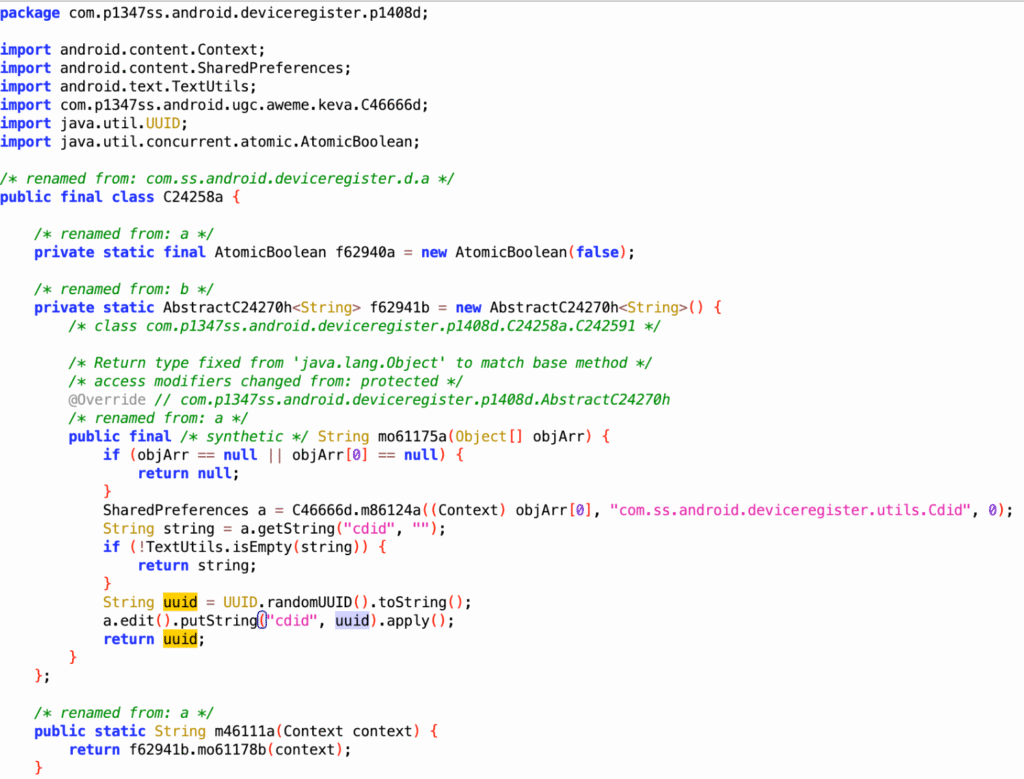
Practical Case Study: The ‘udid‘ parameter in an application’s API
import java.util.UUID;

public class Hello {
    public static void main(String[] args){
        String uid = UUID.randomUUID().toString();
        System.out.println(uid);
    }
}import uuid
uid = str(uuid.uuid4())
print(uid)
# 29cd5f50-4b4c-457b-9a59-33a12e3edd10 1.First type: using UUID
During packet capture, it was found that the value is different for each request, for example:
d7cb3695-5105-4aaa-b0a8-8188e0977143
2.UUID generation on first run
– At the initial startup: call the UUID algorithm to generate a value.
– Write it into an XML file.
– Reuse process:
– First check the XML file for the value.
– If not found, fall back to the UUID algorithm.
Testing scenario:
– Clearing app data alone is not enough.
– The app must be uninstalled and reinstalled.
Hidden Bytes #
TreeMap map = new TreeMap();
map.put("sign",x);

// Search keyword sign
// This is equivalent to:

// Originally what we saw in the code was map.put("sign", x).
// But in actual APP runtime, it might not directly hardcode "sign", but instead construct a string (a) through a byte array, then use it as a key.
// So in the source code or decompiled results, you might not see plaintext like "sign", but rather something like the above new String(new byte[]{...}).String a = new String(new byte[]{-26, -83, -90, -26, -78, -101, -23, -67, -112});
TreeMap map = new TreeMap();
map.put(a,x);
# Hook mechanism: find the put method in TreeMap, and replace it with one of my own methods.
function newPut(key,value){
console.log(key,value); then retrieve the call stack。
}
String salt = "de36f89ab508f700b5c9";String hiddenKey = new String(new byte[]{-26, -83, -90, -26, -78, -101, -23, -67, -112});String hiddenText = new String(new byte[]{26, 83, 90, 26, 78, 101, 23, 67, 112});# Byte list
byte_list = [26, 83, 90, 26, 78, 101, 23, 67, 112]
# Byte list -> python的Byte array
byteBuffer = bytearray()
for value in byte_list:
byteBuffer.append(value)
# python的Byte array -> Encoding -> String
decodedString = byteBuffer.decode('utf-8')
print(decodedString)String hiddenKey = new String(new byte[]{-26, -83, -90, -26, -78, -101, -23, -67, -112});
# java字节:Signed -128 ~ 127
# python:Unsigned 0 ~ 255byte_list = [-26, -83, -90, -26, -78, -101, -23, -67, -112]
byteBuffer = bytearray() # pythonByte array
for value in byte_list:
if value < 0:
value = value + 256
byteBuffer.append(value)
decodedString = byteBuffer.decode('utf-8') # data = bytes(byteBuffer)
print(decodedString)Note: What encoding? (utf-8)
String hiddenKey = new String(new byte[]{-26, -83, -90, -26, -78, -101, -23, -67, -112});
# Similar to a Byte array in Java
data = "this is chacter"
data_bytes = data.encode('utf-8')


data_list = bytearray()
for value in data_bytes:
    data_list.append(value)

result = data_list.decode('utf-8')
print(result)
Reminder: MD5 encryption salt, AES encryption key, IV
Hexadecimal Strings #
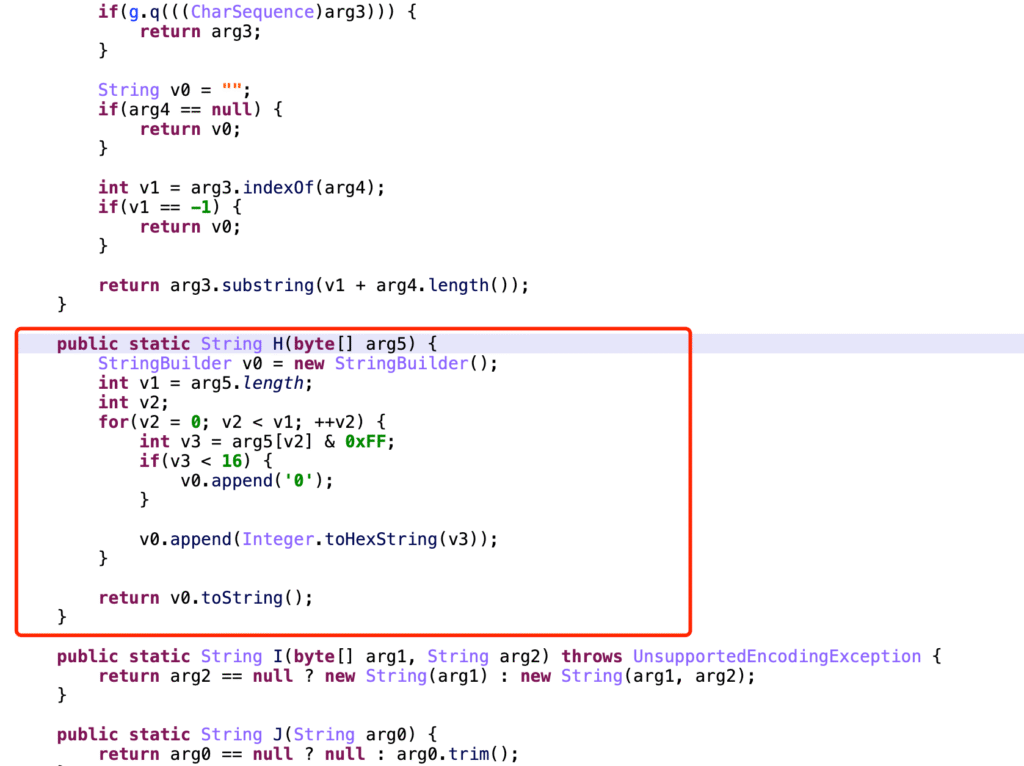
name_bytes = "Joe Biden".encode('utf-8')
# Original line (commented out): encodes Chinese characters to UTF-8 bytes


# name_bytes = [10, -26, -83, -90, -26, -78, -101, -23, -67, -112]
# Predefined list of byte values (signed integers)

data_list = []
# Initialize an empty list to store hexadecimal strings

for value in name_bytes:
    # Iterate over each byte in name_bytes

    value = value & 0xff
    # Convert signed byte to unsigned (0-255 range)

    ele = "%02x" % value
    # Format the byte as a 2-digit lowercase hexadecimal string

    data_list.append(ele)
    # Append the formatted string to data_list


print("".join(data_list))
# Join all hexadecimal strings and print the result
Md5 hash #
import hashlib

obj = hashlib.md5()
obj.update('Joe Biden'.encode('utf-8')) #

# This feature does not exist in Java.
hiddenText = obj.hexdigest()
# It produces no output — the return value is None.
# It only feeds the data into the hash object obj,
# which is equivalent to adding "xxxxx" into the MD5 calculation.

print(hiddenText) # 4d9ff43ee3ddaa56d480f4a8ac2e4798

digest = obj.digest()
print(digest) # b'M\x9f\xf4>\xe3\xdd\xaaV\xd4\x80\xf4\xa8\xac.G\x98'package EncryptionToolkit;
import java.security.MessageDigest;
import java.security.NoSuchAlgorithmException;
/**
* @author calleng
* @version 1.0
* @date 2024/07/07 12:33
* @desc
*/
public class Md5Encrypted
{
public static void main(String[] args) throws NoSuchAlgorithmException {
String name = "United Sate of America";
MessageDigest instance = MessageDigest.getInstance("MD5");
byte[] nameBytes = instance.digest(name.getBytes());
// Display in hexadecimal
StringBuilder sb = new StringBuilder();
for(int i=0;i<nameBytes.length;i++){
int val = nameBytes[i] & 255; // Convert negative numbers to positive
if (val < 16){
sb.append("0");
}
sb.append(Integer.toHexString(val));
}
String hexData = sb.toString();
System.out.println(hexData); // e6ada6e6b29be9bd90
}
}
// You can also know what ciphertext it uses when encrypting, do you understand? For example, let's look at Java, how MD5 encryption is implemented, like this, it's two steps. Create an MD5 encryption object, then after getting this object, convert your text to bytes, for example, execute its business, right? Execute its list, then you can actually get a result. Look, this is one method, one method, directly pass the value here, directly encrypt it, after getting the encrypted content, I convert it to a hexadecimal string,
// Then output it, right? If so, can't you hook the digest method in this class: byte[] nameBytes = instance.digest(name.getBytes());, see what plaintext it passes in, right? Then you can confirm whether it's actually executed, and also know what the plaintext is during encryption, so you can get it, right? So later you can see, based on this, I give you this method, hook it to my own, for example, pass a body here, this body is a byte, everyone, when you get this byte, isn't this a byte in Java? That is, convert this string to bytes, if you want to output here, console.log, can't you first convert Java bytes to string, then output it, after outputting, don't you know what the plaintext is, then get something else here, look, after execution it gets a result which is nameBytes, which means this result is not the point here, it executes the original encryption, after encryption the result it gets is what, isn't it another byte array (byte[] nameBytes), then you can based on code we write ourselves, convert this byte array to string console.log(res) and output it, after outputting you know what its ciphertext is, right? It might be here or not, but you can output return res; This way you can prove what its parameter value is, and know, user proves whether it executed this MD5 encryption, additionally compare its hook result with the result you got from packet capture, see if these two are the same, if they're the same, then this must be where this algorithm is generated, right? So you can also do it based on this mechanism. Execute digest.import hashlib
m = hashlib.md5()
# Create an MD5 object
m.update("United Sate of America".encode("utf-8"))
# Update the MD5 object by encoding the string into UTF-8 bytes and adding it to the object
hiddenText = m.digest()
# Compute the MD5 hash value and return it as a byte object
print(hiddenText)
# b'\xdb5\xe3:{\x9a\xc8\xde\xaf\x8eDF\xbe\xe1|\x82'
functionText = m.hexdigest()
# Compute the MD5 hash value and return it as a hexadecimal string
print(functionText)
# db35e33a7b9ac8deaf8e4446bee17c82About Salt to encryption.
package EncryptionToolkit;

import java.security.MessageDigest;
import java.security.NoSuchAlgorithmException;
import java.util.Arrays;

/**
 * @author calleng
 * @version 1.0
 * @date 2024/07/07 16:16
 * @desc
 */

public class Md5SaltEncryption {
    public static void main(String[] args) throws NoSuchAlgorithmException {
        String name = "This is a normal string";

        MessageDigest instance = MessageDigest.getInstance("MD5");   // Create MD5 object

        instance.update("This is my added salt".getBytes());

        byte[] nameBytes = instance.digest(name.getBytes());  // Get the byte encoding

        System.out.println("Obtained byte encoding - nameBytes ----> " + Arrays.toString(nameBytes));

        String res = new String(nameBytes);
        System.out.println("new String - nameBytes --> " + res);

        // Hexadecimal processing of bytes
        StringBuilder sb = new StringBuilder();
        for(int i = 0; i < nameBytes.length; i++){
            System.out.println("i value is --> " + i);

            int val = nameBytes[i] & 255;  // Convert negative numbers to positive
            if (val < 16){
                sb.append("0");
            }
            sb.append(Integer.toHexString(val));
        }
        String hexData = sb.toString();
        System.out.println(hexData); // 162588573c339c979f695b751a4eabbb
    }
}


// /home/calleng/option/JDK_17.0.12_Oracle/bin/java -javaagent:/home/calleng/option/ideaIU-2023.3.2/lib/idea_rt.jar=45599:/home/calleng/option/ideaIU-2023.3.2/bin -Dfile.encoding=UTF-8 -classpath /home/calleng/AndroidStudioProjects/Ja_Ga_bic1/out/production/Ja_Ga_bic1 EncryptionToolkit.Md5SaltEncryption
//Obtained byte encoding - nameBytes ----> [22, 37, -120, 87, 60, 51, -100, -105, -97, 105, 91, 117, 26, 78, -85, -69]
//new String - nameBytes --> %�W<3���i[uN��
//i value is --> 0
//i value is --> 1
//i value is --> 2
//i value is --> 3
//i value is --> 4
//i value is --> 5
//i value is --> 6
//i value is --> 7
//i value is --> 8
//i value is --> 9
//i value is --> 10
//i value is --> 11
//i value is --> 12
//i value is --> 13
//i value is --> 14
//i value is --> 15
//162588573c339c979f695b751a4eabbb
//
//Process finished with exit code 0

// But when doing some development, they not only use digest but also use its update. For example, instance.update("This is my added salt".getBytes()); Look, everyone, there's also this, through this instance.update, for example, they add salt to it, you see, for example, we create an MD5 object, then through instance.update(), for example, add a value inside which is equivalent to adding salt, then call instance.digest() to encrypt it, so some people, when using MD5, they only use update, for example, it's actually a method. I've taken out this third one for everyone,


       // MessageDigest instance = MessageDigest.getInstance("MD5");
      //  byte[] nameBytes = instance.digest(name.getBytes());

// Ah, for example, this is one encryption method, some people will write it this way. Others might have you write it together like this, it can also support this kind of writing


       // MessageDigest instance = MessageDigest.getInstance("MD5");
        //instance.update("This is my added salt".getBytes());
        // byte[] nameBytes = instance.digest(name.getBytes());


       // MessageDigest instance = MessageDigest.getInstance("MD5");
        //instance.update("This is my added salt".getBytes());
        // byte[] nameBytes = instance.digest();

// These are all executing encryption, because sometimes empty values are passed, some people write it this way, they actually have the same effect during encryption. So if we want to hook it later, can't we find the update method in MessageDigest to hook? At the same time, find its digest method to hook, so that we can get all the plaintext that might be passed in, right?

// So after you know this, some people based on this hook mechanism, call it "automatic plaintext export" or "self-spitting algorithm" or similar, actually it's just a name they gave themselves, in reality it's implemented based on the hook mechanism.

// Therefore, to learn this technology, you need to be able to read Java code, know what MD5 looks like, and then write hook scripts based on it. This is the MD5 related content.

// The MD5 code here is just written by me for demonstration and hasn't been run. If you want to run it, we just drag the code to the IDE and run it directly.

// So you need to clearly know the MD5 object and its identifier, it will execute update and digest methods, and then process 16 hexadecimal bytes. Okay, below we look at a screenshot from reverse engineering.
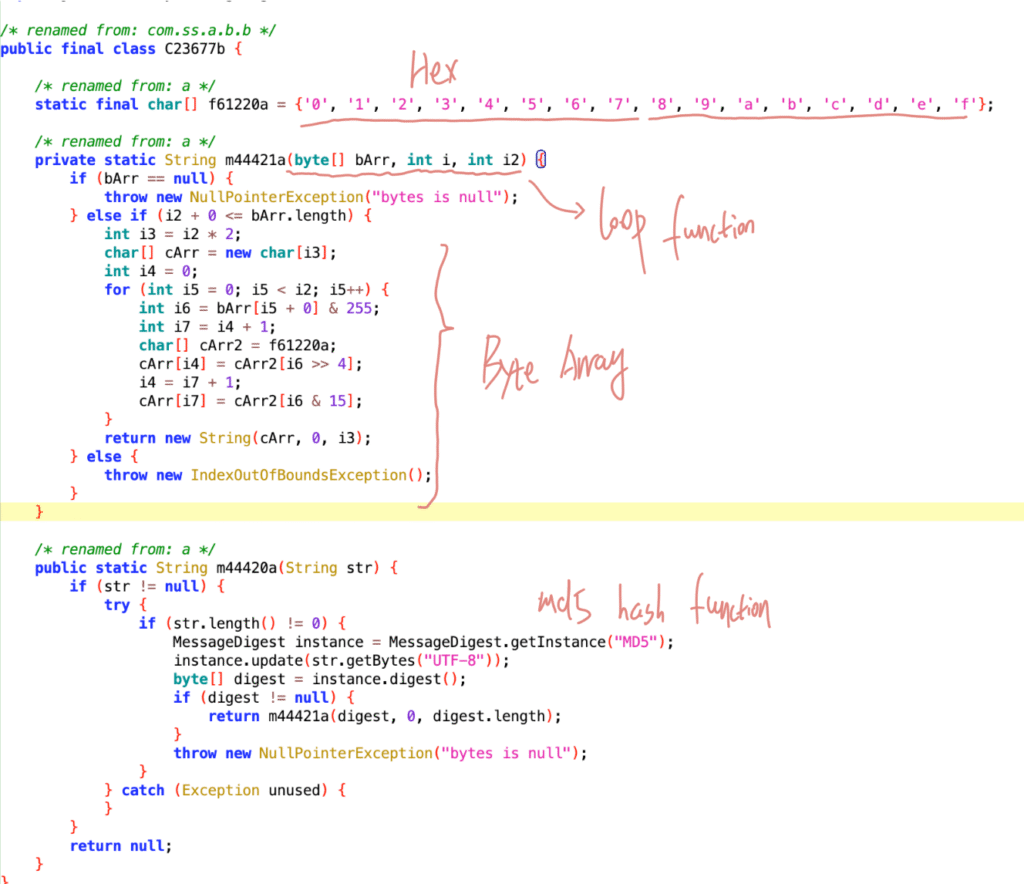
tiktok:X-SS-STUB #
Each time a POST request is sent, tiktok includes some request headers:
X-SS-STUB = “4d9ff43ee3ddaa56d480f4a8ac2e4798”
It reads the data from the request body and performs an MD5 hash on the body content.
import hashlib

m = hashlib.md5("This is a normal string".encode('utf-8'))
m.update("This is my added salt".encode("utf-8"))

digested_string = m.hexdigest()
print(digested_string) # 17351012472429d52d0c0d23d468173d
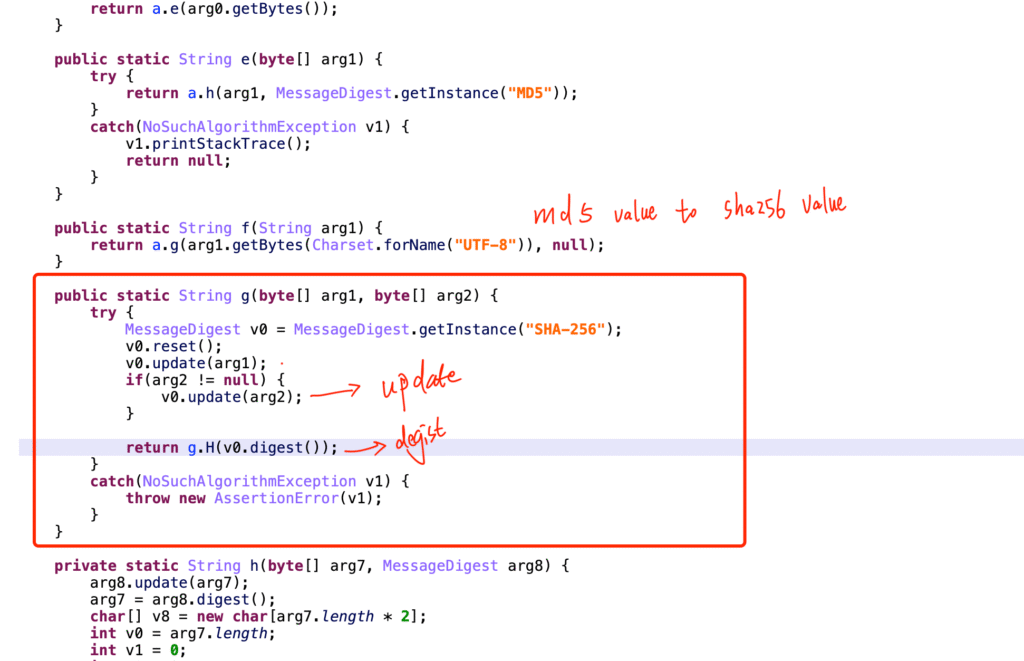
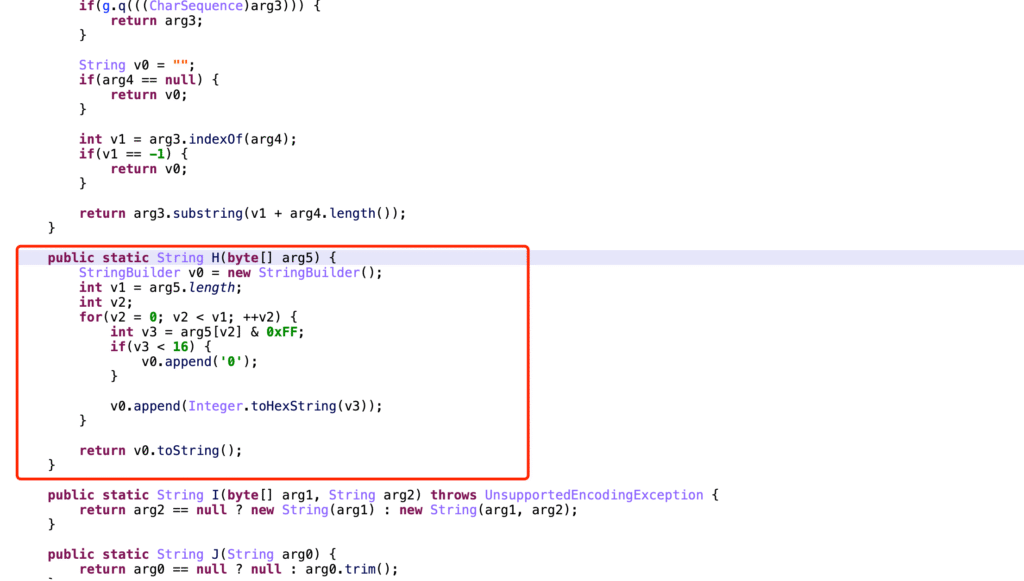
Sha-256 Hash #
A real case study, parameters. Youtube: x/report/andriod2, Request Body
package EncryptionToolkit;

import java.security.MessageDigest;
import java.security.NoSuchAlgorithmException;

/**
 * @author calleng
 * @version 1.0
 * @date 2024/07/07 16:09
 * @desc
 */

public class Sha256Encryption {
    public static void main(String[] args) throws NoSuchAlgorithmException {
        String name = "This is test String";
        MessageDigest instance = MessageDigest.getInstance("SHA-256");
        byte[] nameBytes = instance.digest(name.getBytes());
        // System.out.println(Arrays.toString(nameBytes));

        // String res = new String(nameBytes);
        // System.out.println(res);

        // Display in hexadecimal
        StringBuilder sb = new StringBuilder();
        for(int i = 0; i < nameBytes.length; i++){
            int val = nameBytes[i] & 255;  // Convert negative numbers to positive
            if (val < 16){
                sb.append("0");
            }
            sb.append(Integer.toHexString(val));
        }
        String hexData = sb.toString();
        System.out.println(hexData); // 5d68f9caecb326ff4d30e64436021857ec46d47c30b17817d7b0ac663721c480
    }
}
import hashlib

m = hashlib.sha256()
m.update("This is test String".encode("utf-8"))

digested_value = m.hexdigest()
print(digested_value)
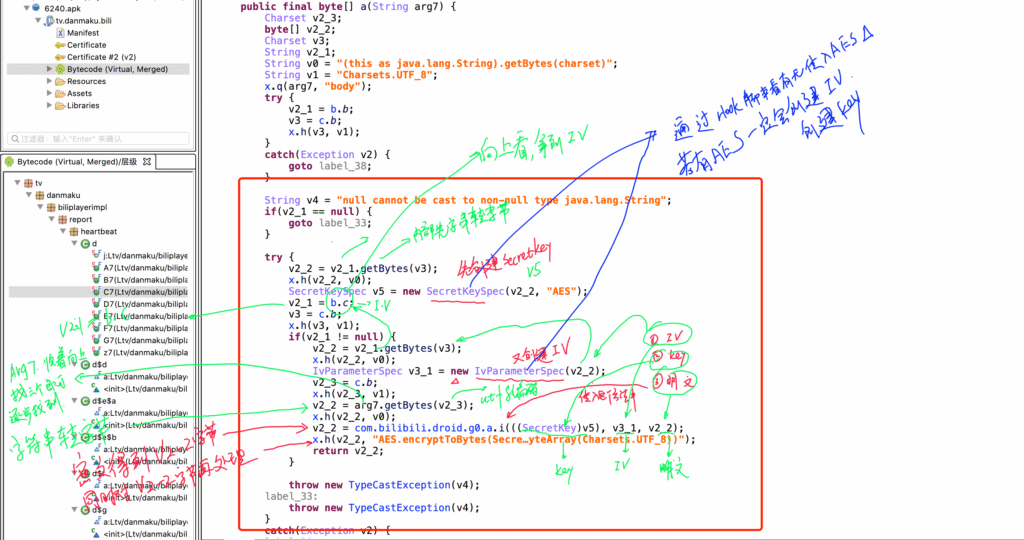
AES Encryption #
Symmetric Encryption
- Key & IV, plaintext encryption. [App side]
- Key & IV, decryption. [API side]
Case A: Encrypted request body (garbled text when captured)
Case B: sign, AES encryption + Base64 encoding
When playing videos on youtube, a POST request is sent.
AES encryption (on the data in the request body) → ciphertext (encrypted using the JS youtube Video key
description
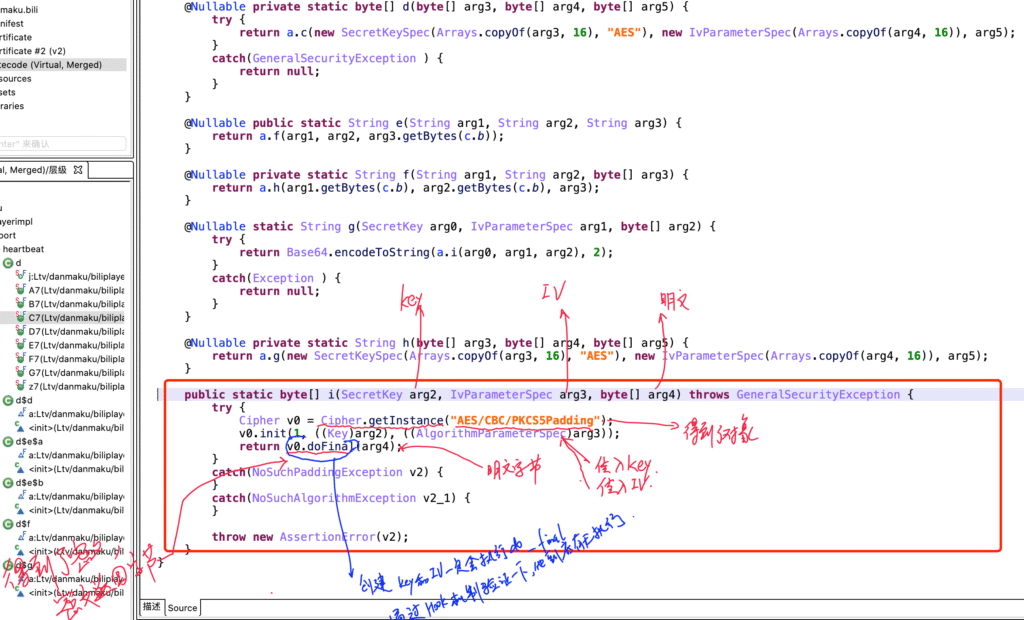
package EncryptionToolkit;

import javax.crypto.Cipher;
import javax.crypto.spec.IvParameterSpec;
import javax.crypto.spec.SecretKeySpec;
import java.util.Arrays;

/**
 * @author calleng
 * @version 1.0
 * @date 2024/07/07 16:01
 * @desc
 */

public class AesEncryption {
    public static void main(String[] args) throws Exception {
        String data = "This is test String";
        String key = "17351012472429d52d0c0d23d468173d";
        String iv = "e6ada6e69be9bd90";

        // Encryption
        byte[] raw = key.getBytes();
        SecretKeySpec skeySpec = new SecretKeySpec(raw, "AES");  // Create key object
        // getEncoded() retrieves the private key of the class as a byte array
        IvParameterSpec ivSpec = new IvParameterSpec(iv.getBytes());   // Create IV object. CBC mode requires an IV vector.
        // iv.getIV() → retrieves the private field [private byte[] iv;] → returns IV as a byte array

        // getInstance is just a method from javax.crypto.Cipher
        Cipher cipher = Cipher.getInstance("AES/CBC/PKCS5Padding");  // Instantiate with "algorithm/mode/padding"

        /*
        The second parameter is the key object
        The third parameter is the IV object
         */
        cipher.init(Cipher.ENCRYPT_MODE /* This is by default integer value 1 */, skeySpec /* key object */, ivSpec /* IV object */);

        byte[] encrypted = cipher.doFinal(data.getBytes());

        System.out.println(Arrays.toString(encrypted));
    }
}

// [60, 45, -21, -72, 97, -50, 118, 92, 124, -120, 89, 102, 28, 89, 124, 125, -128, -59, 73, -99, -37, 29, 77, -3, 118, 122, 49, -13, 115, 23, -15, -19]
# pip install pycryptodome
from Crypto.Cipher import AES
from Crypto.Util.Padding import pad

KEY = "17351012472429d52d0c0d23d468173d"
IV = "e6ada6e69be9bd90"


def aes_encrypt(data_string):
    aes = AES.new(
        key=KEY.encode('utf-8'),
        mode=AES.MODE_CBC,
        iv=IV.encode('utf-8')
    )
    raw = pad(data_string.encode('utf-8'), 16)
    return aes.encrypt(raw)

data = aes_encrypt("This is test String")
print(data)
print([ i for i in data])

# b'<-\xeb\xb8a\xcev\\|\x88Yf\x1cY|}\x80\xc5I\x9d\xdb\x1dM\xfdvz1\xf3s\x17\xf1\xed'
# [60, 45, 235, 184, 97, 206, 118, 92, 124, 136, 89, 102, 28, 89, 124, 125, 128, 197, 73, 157, 219, 29, 77, 253, 118, 122, 49, 243, 115, 23, 241, 237]
gzip compress #
TikTok registration device: device.
When registering a device, some values are generated, including: cdid, phone model, phone brand…. When the backend receives these values, if it detects that the cdid is from a completely new request, TikTok will generate: device_id, install_id, tt.
(cdid, phone model, phone brand, …)
–> GZIP compression (bytes)
–> Encryption
–> Ciphertext
package EncryptionToolkit;

import java.io.ByteArrayInputStream;
import java.io.ByteArrayOutputStream;
import java.io.IOException;
import java.util.Arrays;
import java.util.zip.GZIPInputStream;
import java.util.zip.GZIPOutputStream;

/**
 * @author calleng
 * @version 1.0
 * @date 2024/07/07 16:57
 * @desc
 */

public class GzipCompress { // Define a GzipCompress class

    public static void main(String[] args) throws IOException { // Main method, throws IOException

        // Compression
        String inputData = "I'm Joe Biden"; // Define the string data to be compressed
        System.out.println(Arrays.toString(inputData.getBytes())); // Convert the string into a byte array and print it

        ByteArrayOutputStream compressedOutputStream = new ByteArrayOutputStream(); // Store compressed result
        GZIPOutputStream gzipOutputStream = new GZIPOutputStream(compressedOutputStream); // GZIP compression stream
        gzipOutputStream.write(inputData.getBytes()); // Write the string's byte array into the compression stream
        gzipOutputStream.close(); // Close the compression stream to finish compression

        byte[] compressedBytes = compressedOutputStream.toByteArray(); // Get compressed byte array
        System.out.println(Arrays.toString(compressedBytes)); // Print compressed bytes

        // Decompression
        ByteArrayOutputStream decompressedOutputStream = new ByteArrayOutputStream(); // Store decompressed result
        ByteArrayInputStream compressedInputStream = new ByteArrayInputStream(compressedBytes); // Input stream from compressed data
        GZIPInputStream gzipInputStream = new GZIPInputStream(compressedInputStream); // GZIP decompression stream

        byte[] buffer = new byte[256]; // Temporary buffer
        int bytesRead; // Number of bytes read per iteration

        while ((bytesRead = gzipInputStream.read(buffer)) >= 0) { // Read until EOF
            decompressedOutputStream.write(buffer, 0, bytesRead);
        }

        byte[] decompressedBytes = decompressedOutputStream.toByteArray(); // Get decompressed byte array
        System.out.println(Arrays.toString(decompressedBytes)); // Print decompressed bytes
        System.out.println(decompressedOutputStream.toString("UTF-8")); // Convert to string and print
    }
}


//[73, 39, 109, 32, 74, 111, 101, 32, 66, 105, 100, 101, 110]

//[31, -117, 8, 0, 0, 0, 0, 0, 0, -1, -13, 84, -49, 85, -16, -54, 79, 85, 112, -54, 76, 73, -51, 3, 0, 66, 105, -50, -120, 13, 0, 0, 0]

//[73, 39, 109, 32, 74, 111, 101, 32, 66, 105, 100, 101, 110]
//I'm Joe Bide
Reminder: Java and Python handle bytes differently. (The representation of byte values may differ, but it does not affect the overall result.)
import gzip


# compress

s_in = "I'm Joe Biden".encode('utf-8')
s_out = gzip.compress(s_in)

print([i for i in s_out])


# decompress

result = gzip.decompress(s_out)
print(result)
print(result.decode('utf-8'))

#  [31, 139, 8, 0, 197, 84, 189, 104, 2, 255, 243, 84, 207, 85, 240, 202, 79, 85, 112, 202, 76, 73, 205, 3, 0, 66, 105, 206, 136, 13, 0, 0, 0]
# b"I'm Joe Biden"
# I'm Joe Biden
Base64 Encoding #
package EncryptionToolkit;

import java.util.Base64;

public class Base64Encode { // Define Base64Encode class
    public static void main(String[] args) { // Main method entry point
        String name = "I'm Joe Biden"; // Define the string to be encoded

        // Encoding
        Base64.Encoder encoder = Base64.getEncoder(); // Get a Base64 encoder
        String res = encoder.encodeToString(name.getBytes()); // Convert the string into a byte array and encode it with Base64
        System.out.println(res); // Print the encoded result

        // Decoding
        Base64.Decoder decoder = Base64.getDecoder(); // Get a Base64 decoder
        byte[] origin = decoder.decode(res); // Decode the Base64 string back into the original byte array
        String data = new String(origin); // Convert the decoded byte array into a string
        System.out.println(data); // Print the decoded result
    }
}

// SSdtIEpvZSBCaWRlbg==
// I'm Joe Bidenimport base64
name = "I'm Joe Biden"
result = base64.b64encode(name.encode('utf-8'))
print(result) # b'SSdtIEpvZSBCaWRlbg=='
data = base64.b64decode(result)
origin = data.decode('utf-8')
print(origin) # "I'm Joe Biden"